A FEN (Forsyth–Edwards Notation) is a chess position written as one line of text. With it, you can open the position on Lichess, Chess.com or in any chess program, analyse it with an engine, and share it with anyone. When the position is in a book, a screenshot or a video, here is how to get its FEN.
What a FEN looks like
The starting position is:
rnbqkbnr/pppppppp/8/8/8/8/PPPPPPPP/RNBQKBNR w KQkq - 0 1
- The first field is the board, from the 8th rank down to the 1st, separated by slashes. Capital letters are White’s pieces (K king, Q queen, R rook, B bishop, N knight, P pawn), small letters are Black’s, and a digit counts empty squares.
- Next comes the side to move:
worb. - Then who may still castle, and on which side:
KQkq, or-when nobody can. - Then the en passant square, or
-. - The last two numbers count moves: half-moves since the last capture or pawn move, and the move number.
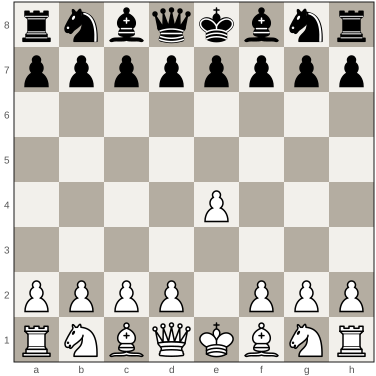
After 1.e4, it becomes:
rnbqkbnr/pppppppp/8/8/4P3/8/PPPP1PPP/RNBQKBNR b KQkq e3 0 1
Way 1: write it by hand
For a simple position, such as an ending with a few pieces, you can write the FEN yourself. Go rank by rank from the top, counting the empty squares. It takes a minute, and it is easy to get wrong: one miscounted rank shifts every piece after it. Check the result by drawing it, for example with the free FEN to image tool.
Way 2: set it up on a board editor
Lichess and Chess.com both have a board editor: drag the pieces onto an empty board, choose the side to move, and copy the FEN it shows. This is reliable, but slow for a full middlegame, and you still read every square off the picture yourself.
Way 3: let GreyChess read the picture
GreyChess reads the position from the picture for you. Paste a screenshot, drop a photo or open a chess book: it finds the board, reads each square, and rings the squares it is unsure of, so you check only those. Then copy the FEN or PGN from the board’s menu, or open the position on Lichess.
- From a book: open the PDF or ePub in GreyChess, and each diagram is read onto the board beside the page.
- From a web page or a video: the browser extension for Chrome, Edge and Firefox reads the boards on a page, and on YouTube, the paused frame.
- From a photo or a scan: a straight, sharp, well-lit picture reads best.
What a picture cannot tell you
A diagram shows the pieces, not the game that led to them. Three things may need your help:
- The side to move. Books usually say it under the diagram, such as “White to move”. Set it before you copy the FEN.
- Castling rights. A king and rook on their first squares may already have moved. If the book does not say, leave castling off, unless the position comes from an opening.
- En passant. This matters only if the last move was a pawn’s double step, which a diagram rarely shows.
Get those right, and the FEN is as good as the book’s own position.