FEN (Forsyth-Edwards Notation) is a single line of text that describes one chess position completely. Every chess program and website understands it, so it is the easiest way to move a position from a book, a game or a picture into an engine, or to share it with a friend.
Here is the starting position in FEN:
rnbqkbnr/pppppppp/8/8/8/8/PPPPPPPP/RNBQKBNR w KQkq - 0 1
It looks cryptic, but it has six parts, separated by spaces.
1. Where the pieces are
The first and longest part is the board, one rank at a time, from the 8th rank (Black's side) down to the 1st, separated by slashes. Within each rank it goes from the a-file to the h-file.
- Pieces use their letters: k king, q queen, r rook, b bishop, n knight, p pawn.
- Capitals are White, small letters are Black.
- A number is that many empty squares: 8 is an empty rank, 3 three empty squares.
So rnbqkbnr is Black's back rank in the starting position, and 8 in the middle is an empty rank. Each rank must add up to eight squares.
2. Who is to move
w for White, b for Black. This matters more than it looks: the same position can be winning for whoever moves.
3. Castling rights
Which castlings are still possible: K White on the king's side, Q White on the queen's side, k and q the same for Black. - means nobody can castle. This says whether castling is allowed in principle, not whether it is possible this move.
4. En passant
If the last move was a pawn moving two squares, this is the square behind it, where a pawn could take en passant. Otherwise -.
5. The halfmove clock
Moves since the last capture or pawn move, for the fifty-move rule. For most uses, 0 is fine.
6. The move number
The number of the full move, starting at 1 and going up after each Black move.
An example
After 1.e4, the FEN becomes:
rnbqkbnr/pppppppp/8/8/4P3/8/PPPP1PPP/RNBQKBNR b KQkq e3 0 1
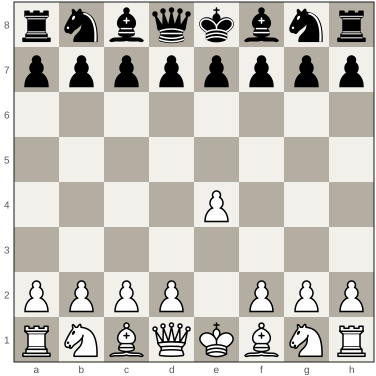
The 4th rank is now 4P3: four empty squares, White's pawn on e4, three empty squares. The 2nd rank is PPPP1PPP, with a gap where the e-pawn was. Black is to move, and e3 is the en passant square.
FEN and PGN
FEN describes one position. PGN describes a whole game, move by move, with the players' names and the result. Use FEN to share a single position, such as a puzzle or a moment from a game; use PGN for the game.
Getting a FEN without typing it
Typing a FEN by hand is slow and easy to get wrong. Some easier ways:
- From a game or analysis board: most chess sites and apps have a "Copy FEN" button, and so does GreyChess.
- From a picture: GreyChess can read a screenshot or photo of a board into a position, ringing any square it is unsure of so you can check it first. More in how to get a FEN from a picture.
- For a diagram: paste a FEN into FEN to image to draw it as a diagram you can download or put on your own page.
Once you can read FEN, you will find you can glance at one and picture the position, which is a small but real help when you set up puzzles and studies.